MediVerify AI

Document verification for billing teams

Catch date mismatches before the bill goes out.

Upload bills and medical records. MediVerify reads each one with OCR, matches it to your client list, and flags wrong dates of birth and dates of accident — with the exact spot on the page.

7-day trial · 15 free documents · no credit card

Works with

  • PDF
  • JPG / PNG
  • Multi-page TIFF
  • CSV & XLSX import
  • Excel, CSV & JSON export
  • REST API & webhooks

The problem

Every bill has to agree with your records. Nobody has time to check.

Checking by hand doesn't scale

Someone opens each bill, finds the patient, and compares dates against a spreadsheet — for every page, every batch.

Small date errors are expensive

A wrong date of birth or accident date can stall a claim or weaken a case, and it's easy to miss on page three.

Scans are messy

Faxes, photos and mixed formats, misspelled names, nicknames and dates written five different ways.

MediVerify does the comparison for you. It reads every page, finds the right client even when the name is spelled differently, checks the dates against your record, and puts only the documents that need a human on your screen.

How it works

From a folder of bills to a clean report in four steps.

  1. 01

    Import your client list

    Upload a CSV or Excel file with names, dates of birth, dates of accident, MRNs and aliases. Columns are recognised automatically — preview before you import.

  2. 02

    Upload documents in a batch

    Drop in PDFs, JPGs, PNGs or TIFFs. Each is read with OCR (or its embedded text), page by page.

  3. 03

    Review only what's flagged

    Each document is matched to a client and checked. Clean ones are marked verified; the rest show exactly what disagrees, highlighted on the page.

  4. 04

    Export or integrate

    Download Excel, CSV or JSON, or pull results through the API and webhooks into your own systems.

Product tour

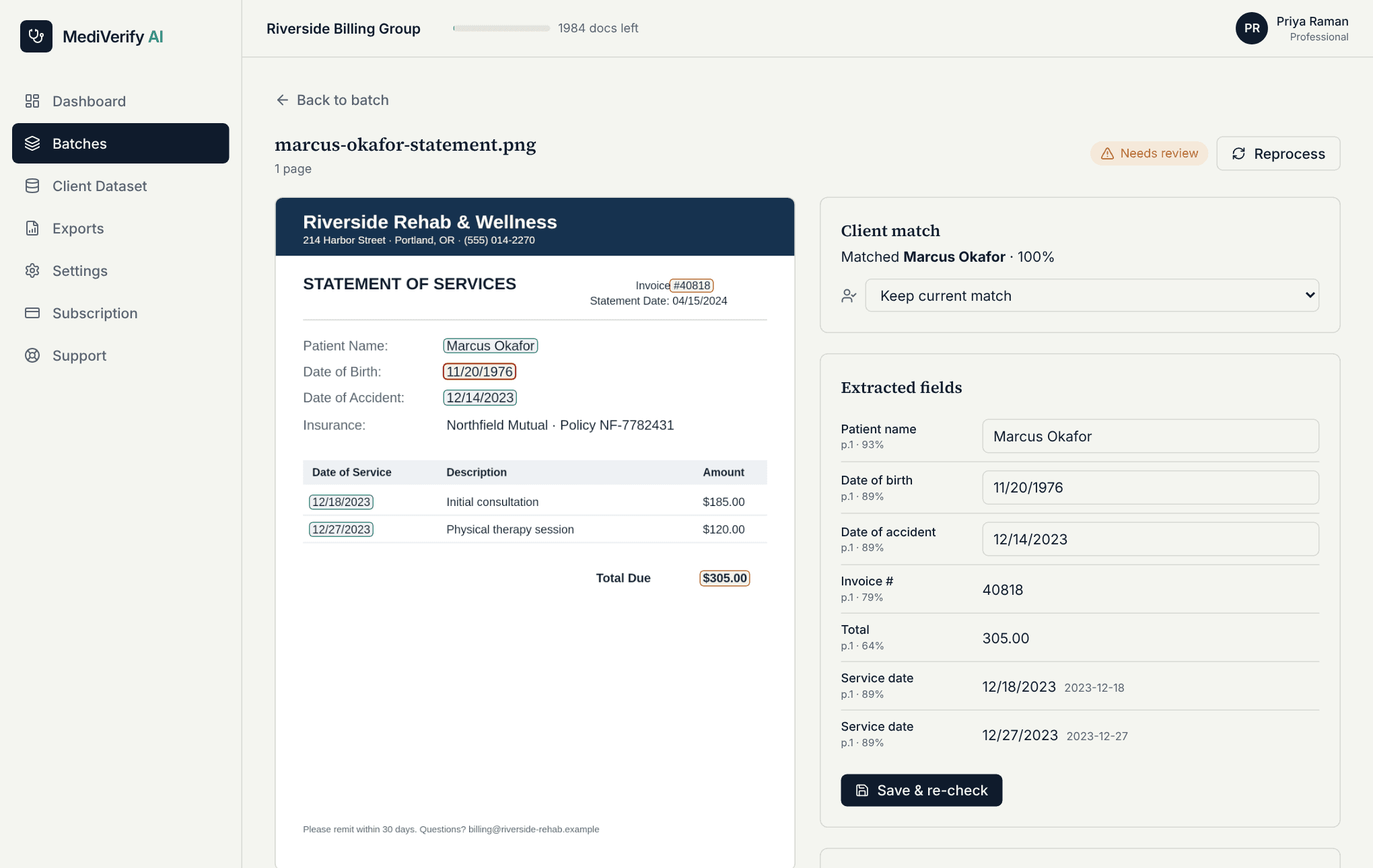
This is the actual product — fictional data.

Every flag points to the exact spot on the page.

The original page sits next to the extracted values. Fix a field or choose the right client and the checks re-run immediately.

  • Highlighted values with per-field confidence
  • Flags by page and field
  • Corrections are logged
app.mediverify.net/dashboard/batches/…/documents/…
MediVerify review screen: the original bill with the date of birth and accident date highlighted and a DoB mismatch flag

Features

Everything between “upload” and “verified”.

OCR for real-world scans

Text PDFs, scanned PDFs, photos and multi-page TIFF. Skewed or noisy pages are cleaned up first, and damaged labels are repaired.

Name, DoB, DoA and service dates

Extracts the patient name, date of birth, date of accident and every service date — plus MRN, account and invoice numbers.

Fuzzy client matching

Handles nicknames, misspellings, word order and aliases. If two clients tie, DoB, DoA and IDs break it; if they still tie, you choose.

Date rules you control

DoB must match exactly. DoA can be strict or allow ± N days. Dates in any common format are normalised first.

Flags with the exact location

Every flag names the field, page and confidence, and the value is boxed on the original page.

Confidence thresholds

Low-confidence reads are flagged instead of trusted. Tune the match and confidence thresholds for your documents.

Fix, don't redo

Correct a value or pick the right client; matching and flags re-run instantly. Corrections are kept for feedback.

Batches that survive a closed tab

Upload hundreds of files; originals are stored first, so interrupted batches can be resumed.

Excel, CSV and JSON

One row per document with confidences and mismatch flags, a per-flag sheet, and filters by mismatch type.

REST API

Create batches, upload via signed URLs, fetch results and exports with an API key.

Notifications

Email and signed webhooks when a batch completes, with automatic retries.

Optional CPT / ICD-10

Turn on extraction of procedure and diagnosis codes when you need them in the export.

Who it's for

Built for the people who check the paperwork.

Billing specialists

Clear a stack of bills in one pass.

Upload the whole batch, get an Excel report of what matches and what doesn't, and get notified when it's done.

  • · Batch upload and notifications
  • · Excel export with mismatch columns
  • · Retry and resume

Auditors, accountants & law firms

A defensible trail for every check.

See exactly what was read, from which page, with what confidence — and who corrected it. Reproduce any result later.

  • · Per-field confidence and page
  • · Corrections and audit log
  • · Redacted exports for sharing

Providers

Catch errors before the bill leaves.

Check your own statements against patient records occasionally, without building a process around it.

  • · Simple upload, clear summary
  • · Plain-language flag reasons
  • · No setup beyond your client list

Security & privacy

Patient data deserves more than a login screen.

Encrypted in transit and at rest

HTTPS everywhere with HSTS. Stored data is encrypted, and extracted text and webhook secrets get an extra application-level layer.

Roles and tenant isolation

Viewer, reviewer and admin roles enforced on the server. Each organization's data is isolated at the database level.

Multi-factor authentication

Optional authenticator-app MFA for every user, enforced at sign-in before anything else loads.

You control retention

Original files are deleted after the period you choose. Extracted results and the audit log stay.

Redaction when you share

Export with names reduced to initials, dates to the year and IDs masked. Server logs are scrubbed of personal data.

Audit trail

Imports, corrections, exports, settings and API keys are logged with who and when.

These are technical controls. Whether your use meets HIPAA or other rules also depends on your agreements, configuration and policies — questions about that are welcome at info@mediverify.net.

API & webhooks

Plug verification into your own workflow.

Create batches, import your client list, upload documents with signed URLs and read structured results — or get a signed webhook the moment a batch completes.

Read the API reference
# 1. reserve an upload for a document in a batch
curl -X POST https://app.mediverify.net/api/v1/documents/upload-url \
  -H "Authorization: Bearer $MEDIVERIFY_KEY" \
  -d '{"batchId":"…","fileName":"bill.pdf","size":120394}'

# 2. PUT the file to the signed URL, then confirm
curl -X POST https://app.mediverify.net/api/v1/documents \
  -H "Authorization: Bearer $MEDIVERIFY_KEY" \
  -d '{"batchId":"…","documentId":"…"}'

# 3. read the result — fields, match and flags
curl https://app.mediverify.net/api/v1/documents/{id} \
  -H "Authorization: Bearer $MEDIVERIFY_KEY"

Pricing

Simple plans, sized by how many documents you check.

Full pricing details
Free

Free Trial

$0

Try it on your own documents

15 documents

1 user

  • Document verification against your client list
  • OCR extraction of name, DoB, DoA & service dates
  • Basic dashboard
  • Excel & CSV export

No credit card required

Starter

$15/month

For growing teams

500 documents/month

Up to 3 team members

  • Batch document upload (PDF, JPG, PNG, TIFF)
  • OCR extraction of name, DoB, DoA & service dates
  • Fuzzy client matching with aliases
  • DoB / DoA mismatch flags with confidence scores
  • Excel, CSV & JSON export
  • Email support

Billed monthly. Cancel anytime.

Most Popular

Professional

$45/month

For medical billing companies & high-volume practices

Up to 2,000 documents/month

Up to 10 team members

  • Everything in Starter, plus:
  • REST API & webhooks
  • Configurable thresholds & DoA tolerance
  • Reviewer corrections & reprocessing
  • Activity logs
  • Team roles & permissions
  • Priority support

Billed monthly. Cancel anytime.

Enterprise

Custom

For hospitals, insurers & enterprise healthcare organizations

Unlimited documents

Unlimited users

  • Everything in Professional, plus:
  • Custom integrations
  • Dedicated account manager
  • HIPAA-ready deployment
  • SLA guarantee
  • Compliance review
  • On-premise or private cloud options
  • White-label solution

We respond within 24 hours.

FAQ

Questions people ask first.

What does MediVerify actually check?

It reads each document, finds the patient name, date of birth, date of accident and service dates, matches the patient to a client in your list, and compares the dates. It flags a wrong DoB, a DoA outside the window you allow, missing dates, unreadable dates and low-confidence reads.

Which files can I upload?

PDF (text or scanned), JPG, PNG and multi-page TIFF, up to 25 MB each by default (configurable). Your client list can be a CSV or an Excel file.

How accurate is the OCR?

It depends on the scan. Clean documents read very well; poor photos, faxes and handwriting are harder. That is why every value has a confidence score, low-confidence reads are flagged rather than trusted, and you can correct anything in the review screen. Try a few of your own documents in the free trial.

What if two clients have the same name?

Date of birth, date of accident and IDs are used as tie-breakers. If they still can't separate the clients, the document is marked ambiguous and you choose.

Does my data leave my browser?

By default OCR runs in the reviewer's browser; the original file and the extracted results are then stored in your private workspace. You can instead choose server-side OCR, which is what API uploads use.

Is it HIPAA compliant?

MediVerify provides technical controls — encryption, roles, audit log, retention and redaction. Compliance also depends on your agreements and how you configure and use the service, so please contact us if you need to discuss your requirements.

Can I export results?

Yes — Excel (with a per-flag sheet), CSV and JSON, filtered by batch, status or mismatch type, with optional PHI redaction.

What happens after the free trial?

You get 7 days and 15 documents free, no credit card. After that, uploads pause until you pick a plan; your data stays.

Try it on your own documents.

Import a client list, drop in a few bills, and see which ones disagree with your records. Seven days, fifteen documents, no credit card.